
Key Takeaways
- Full higher education website redesigns are major milestones, but they are not a sustainable long-term maintenance strategy.
- Over time, institutional websites accumulate front-end technical debt, including outdated dependencies, inconsistent components, and accessibility issues.
- Front-end evolution allows institutions to modernize their website architecture incrementally without rebuilding their CMS or disrupting editorial workflows.
- A structured approach to higher education web development between redesigns improves performance, accessibility, and maintainability.
- Institutions that invest in front-end evolution can extend the lifespan of their websites by three to five years before needing another full redesign.
Think back to when your institution last launched a new website. Everyone was buzzing about the fresh fonts, new colors, and sleek components. Full-scale website redesign projects demand enormous time and resources, plus multiple rounds of development and quality assurance (QA) testing. So what comes next? A launch is an exciting milestone, but it’s not a maintenance strategy. A shiny new website only stays shiny with consistent upkeep. Too often, teams let problems accumulate until a full rebuild feels like the only option.
What’s needed next isn’t demolition, but evolution.
Higher ed teams tend to frame redesigns, audits, and accessibility initiatives as separate projects. What receives far less attention is the discipline of managing the years between them. Front-end evolution is one of the most overlooked ways to keep a higher education website thriving. It bridges the gap between full-scale redesigns, improving performance and maintainability without touching the content management system (CMS) or the content structures beneath it. It’s the right move when your fundamentals are sound, but the codebase has begun to slow you down.
(This is the second post in our series on sustainable front‑end development for higher ed. You can read about separating front‑end code from your CMS in Part 1 here.)
The Work Between Redesigns
Even well-built sites accumulate technical debt, often creating a “front-end drift” that quietly reshapes your codebase over time. A JavaScript library here, a custom style there, missing documentation. Eventually, the codebase becomes harder to maintain. Front-end evolution addresses this wear-and-tear before it becomes expensive or disruptive, preserving what’s working and modernizing what isn’t.
Redesigns are episodic, but maintenance is continuous. Front-end evolution gives structure to the work between them.
Here’s how to build that bridge.
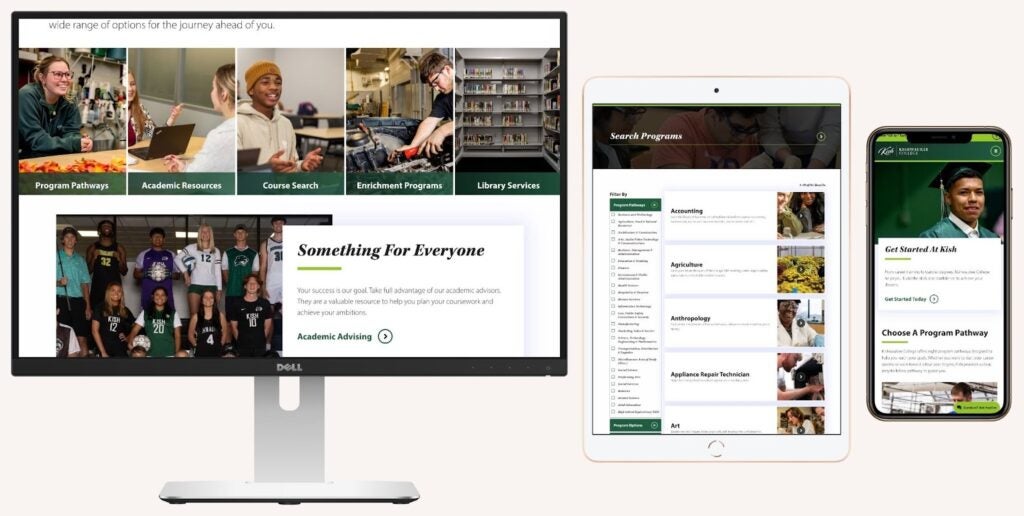
Kishwaukee College worked with Carnegie to refresh its site through code improvements and design system updates without modifying CMS fields or disrupting editor workflows.
A Phased Approach to Front-End Evolution
Each phase builds on the last, moving from diagnosis to implementation to long-term maintenance, without ever touching your content or CMS structures.
1. Review and Audit
Start by auditing the front-end build to identify the source of friction. You’ll likely find user experience (UX) and CMS editor-facing problems, such as accessibility errors, bloated components, or inconsistent button styles, scattered across departments.
Strong audits produce a few concrete, easy-to-share outputs, such as:
- A list of dependencies showing active, outdated, and unused libraries
- A component inventory that reveals duplication and pattern drift
- An accessibility baseline highlighting the most common Web Content Accessibility Guidelines (WCAG) failures
Beyond these tangible outputs, audits often surface structural weaknesses in the front-end architecture itself, from legacy tooling to inefficient build processes. These technical improvements don’t change what users see, but they make the codebase faster, leaner, and easier to maintain in the long run. And because this work focuses on the front-end layer, your content structures and CMS setup remain untouched.
2. Refactor and Modernize
With the audit complete, refactoring tackles two critical areas: accessibility compliance and technical infrastructure. These practices are foundational to modern web development for higher education teams managing complex institutional websites.
Prioritize Accessibility Fixes
Start with accessibility fixes, which are often the most urgent work. Common fixes include missing ARIA labels and color contrast issues, cleaning up heading hierarchy, and ensuring interactive elements are keyboard-accessible with proper focus styles.
Many institutions launch front-end evolution projects in response to accessibility audits or compliance deadlines. These fixes are both high-impact and time-sensitive, especially as the Department of Justice’s ADA Title II Final Rule takes effect. For a detailed look at what the rule requires and how institutions should prepare, check out “The Clock is Ticking: Is Your Institution Ready for the ADA Title II Final Rule?”
Modernize the Technical Foundation
Set up a shared Git repository and front-end staging site for version control if you don’t already have them. From there, remove unused JavaScript libraries and prune stale CSS while updating outdated dependencies. If you’re using a legacy build tool, consider switching to a more modern one.
When evaluating modern front-end build tools, we prioritize speed, long-term maintainability, and tight control over front-end output. At Carnegie, one option that often meets those criteria is Astro, which balances performance gains with a relatively low learning curve.
The goal is surgical fixes, not wholesale rewrites. A well-maintained codebase can support a site for years, making future changes far more manageable.
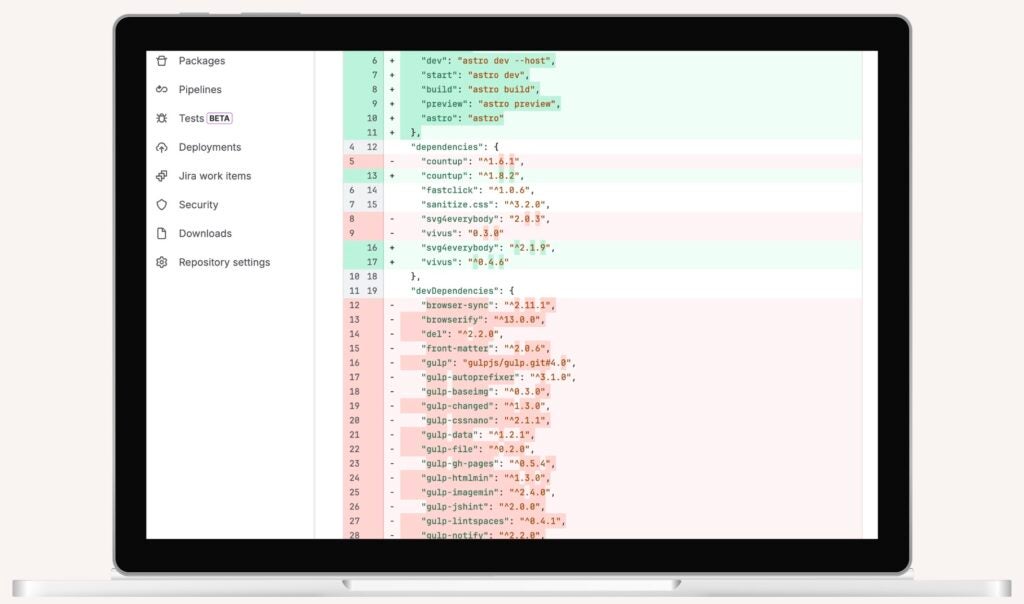
Saint Louis University’s repository mid-evolution shows the unglamorous but necessary work of modernizing build tools, trading complexity for speed.
3. Systematize the Design
With the code cleaned up, shift the focus to the design system. Systematizing your patterns and components keeps one-off fixes and rogue styles from creeping back in.
Clean Up What Editors See
Those five scattered button variations? Consolidate them into one clear set. Prune duplicate components and streamline CMS options so content teams can build pages without second-guessing themselves.
Add New Components Alongside the Old
Build two or three fresh options that give editors more flexibility without forcing them to rebuild existing pages. The key: these new components use your existing data structures, so there’s no content migration or rewriting required.
Here’s how this might look in practice: You design a new program page template and program finder that pulls from the same program data already in your CMS. The old program pages stay put. Editors can start using the new template for new programs, migrate old pages when it makes sense, and eventually retire the outdated version. This lets you make real improvements without disrupting day-to-day work.
Make Future Changes Easier
Component-based styles and utility classes make future additions easier, giving editors flexibility while developers get predictability. When a full redesign isn’t happening anytime soon, this kind of reinvestment can buy you another three to five years.
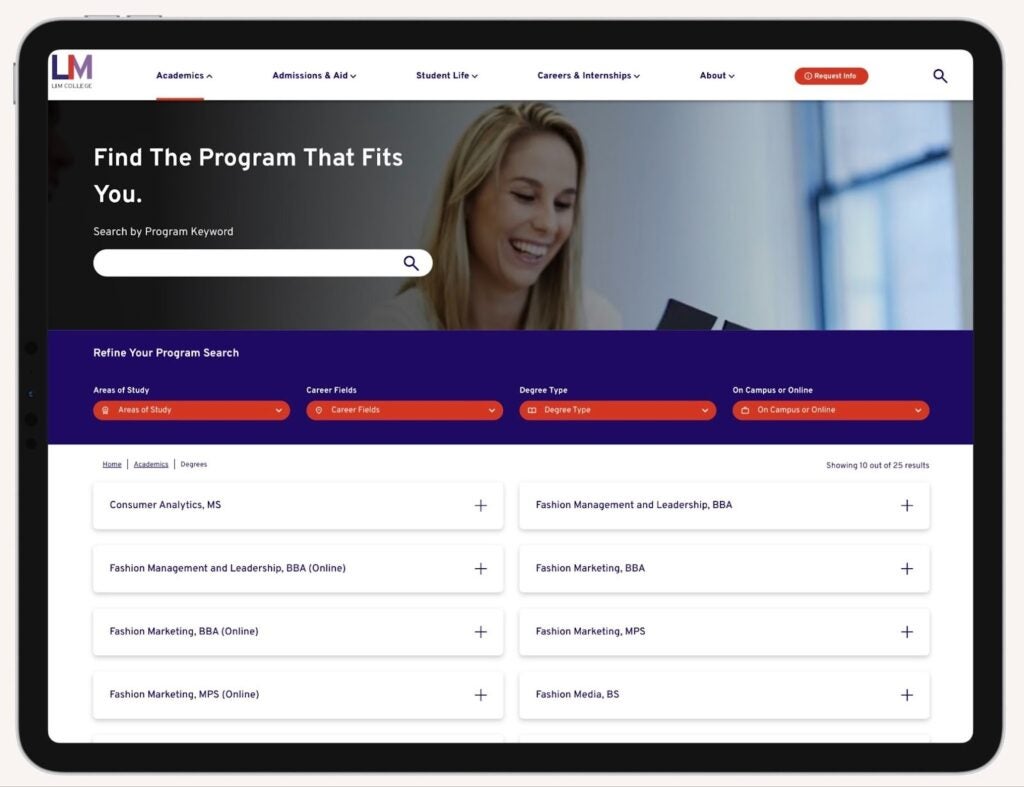
LIM College’s program finder introduces a modern front-end layer on existing data structures, allowing editors to migrate gradually without rebuilding pages or rewriting content.
4. Test and Document
Test with Real Users
Conduct accessibility, usability, and performance testing using real content and representative users. Automated tools like WAVE and Lighthouse catch obvious errors, but manual evaluation is essential: keyboard navigation checks, screen reader reviews, and cross-browser validation often reveal deeper issues automation misses.
Loop in editors for testing, too: they can identify usability problems developers might overlook. The goal is performance that’s fast, clean, and works for everyone.
Create Clear Documentation
Clear documentation smooths handoffs and gets new team members up to speed faster. Well-commented templates and a solid README help people understand how to use, update, and maintain the codebase. This matters even more when you’re introducing new components or changing how styles work. Documentation needs to serve everyone touching the system: developers, back-end engineers, and editors alike, each with different needs but a shared dependency on the codebase being legible and well-explained.
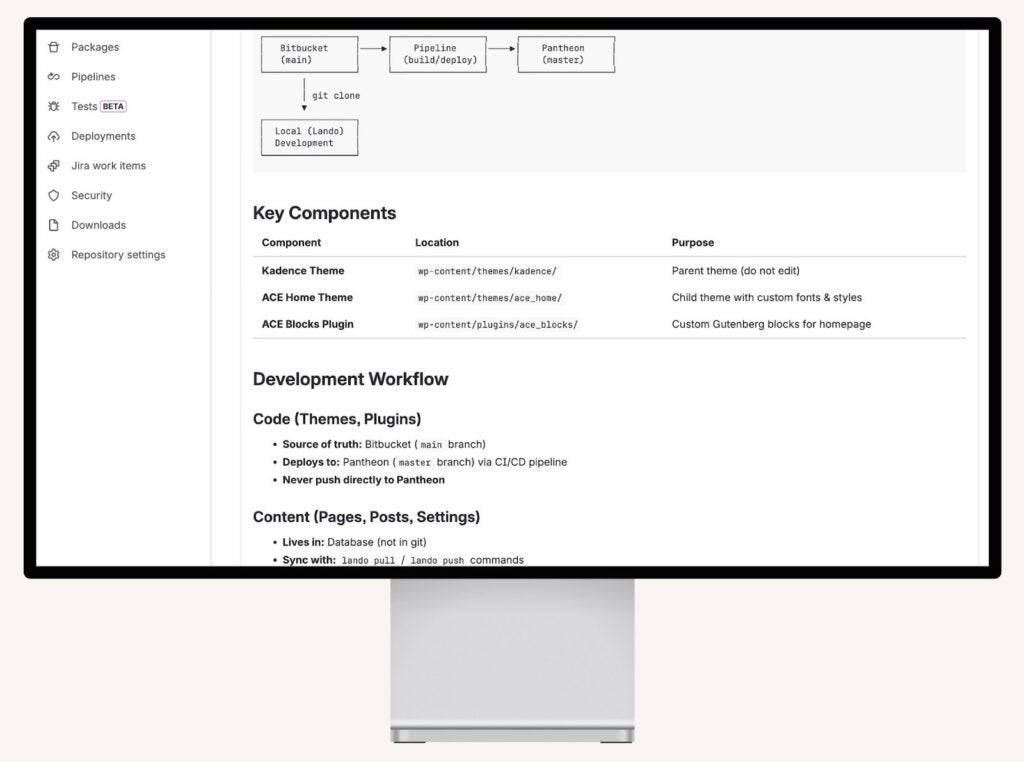
Clear instructions on setup, dependencies, and deployment mean new team members can hit the ground running.
5. Plan for Ongoing Maintenance
Front-end evolution isn’t a one-and-done project. It’s what keeps the bridge standing until your next redesign. Once you’ve modernized the front-end codebase and introduced a selection of new components and features, set some basic expectations to prevent future drift. Schedule quarterly check-ins to review new components before they’re added, retire old components, update dependencies regularly, and maintain your documentation as the system evolves.
This doesn’t require a dedicated front-end or back-end development team. Even small practices, like requiring new components to use existing utility classes or documenting changes in the README, can keep the system healthy. The investment you’ve made in evolution pays off when future updates remain straightforward instead of spiraling into multi-month projects.
Signs Your Higher Education Website May Need Front-End Evolution
Your institution may benefit from front-end evolution if:
- Website updates feel slower or riskier than they used to
- Your codebase includes outdated JavaScript libraries or build tools
- Accessibility issues continue to appear across pages
- Components and design patterns have become inconsistent across departments
- Editors struggle with confusing or duplicated CMS components
These signals often indicate that the front-end layer has drifted over time, even when the underlying CMS and content structures remain solid.
Where to Start
For many higher ed teams, the real challenge isn’t just planning the next website redesign. It’s sustaining performance and usability in the years between them. A front-end evolution creates that bridge, helping institutions move deliberately rather than react to problems as they pile up.
If your website updates feel slower or riskier than they should, it may be time to take a closer look at the health of your front-end codebase. A targeted evolution effort can clarify what to fix, what to leave alone, and where incremental improvements will have the biggest impact.
Carnegie regularly partners with institutions on higher education website development and front-end architecture improvements designed to extend the life of their digital platforms. Let’s talk about where to start—whether that means building internal capacity or bringing in outside support.