
How to Optimize Your College or University’s Google Business Profiles to Drive Organic Traffic
You may not have heard of the term “Google Business Profile” (GBP) before, but you’ve likely seen many of these profiles in search engine results. This is the panel that appears on the right-hand side (on desktop) when you do a branded search. If you go to Google right now and type your institution name in, you’ll see it appear. These profiles contain photos of your institution, address, phone number, website link, and a button to get directions, to name a few elements.
Google Business Profile (GBP), formerly known as Google My Business, is an important asset to your higher education institution because it represents your brand on Google search and Google Maps. Optimizing your GBP helps your university, college, or academic department be more visible to your prospective students when they search for your institution or institutions in the region. Learn how to incorporate GBP in your search engine optimization strategy to elevate your brand presence in organic search!
What Google Business Profiles does your institution have?
Before we dive into the optimization process, you should understand that your institution may have several profiles on Google. These include the main institution-level profile, sub-level profiles for schools, colleges, and departments within your institution, and profiles for different campus locations.
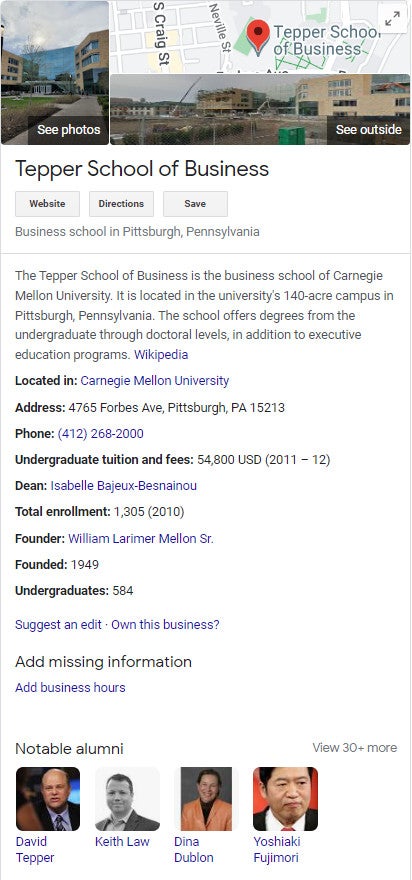
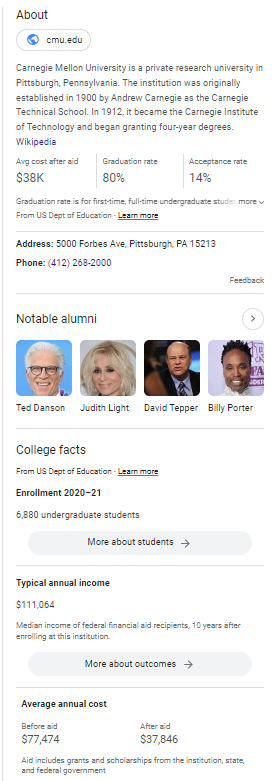
The main institution-level profile on the Search Engine Result Page (SERP) is distinct from the sub-level profiles. On the SERP, you will notice that the institution-level profile usually is combined with the Knowledge Panel, displaying information such as the cost and acceptance rate, but it doesn’t have photos and directions. On the other hand, the sub-level profiles include profile photos and buttons to visit the website, get directions, and make a phone call.
Below is an example of Carnegie Mellon University’s institution-level profile and its sub-level profile—Tepper School of Business.
Why Do You Need to Optimize Your Higher Ed Institution’s GBP?
Google Business Profile is a free tool that you can utilize to accurately present information about your institution on Google and communicate with your target audience. For example, you can have control over your logo, featured images, and contact information.
Imagine a prospective student who wants to contact you to learn more about the admission process, and they search your institution’s name on Google. Would you want them to easily locate your website or phone number in the search results? If a student and their family are planning to visit your campus, and they search your brand name in Google Maps, would you like them to find your latest updates about campus tours or open houses? Yes, your Google Business Profile is what you can count on to accomplish all of the above and more!
In addition, GBP also boosts your visibility by ranking for special SERP features such as the Local Pack, College Pack, and College Cards. These special features make your brand stand out from the other regular search results, increasing awareness and click-through rates.
Learn more about why you should optimize your GBP.
GBP Optimization Checklist for Colleges and Universities
Ready to optimize your school’s Google Business Profile and maximize your organic visibility on the search engine result page (SERP) and Google Maps? Here are the steps you can take.
1. Claim Your Google Listing
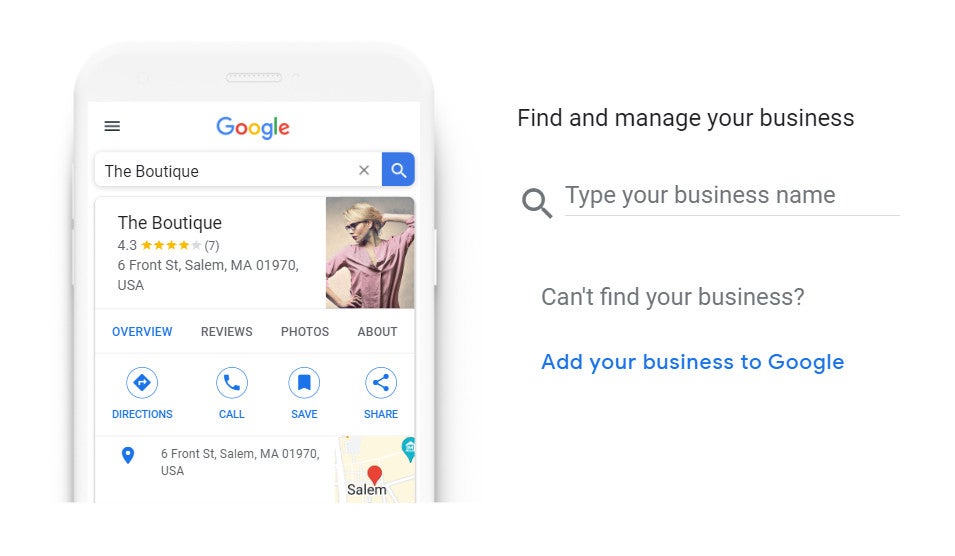
The first step to managing your Google Business Profile is making sure that your school or department already has a listing on Google. You can go to Google Business Profile Manager and type in your business name to see if there’s a listing on Google and request ownership if you have not done so already.
You can also type your business name on Google Maps to find your business listing, and click “Claim this Business”. See Google’s guide about claiming your business listing.
If your institution does not currently have a listing on Google, you can click “add your business to Google” to start a new profile. However, in most cases, if your school or department has been around for a while, the chances are you already have a profile listed on Google.
After claiming ownership, you also need to follow the steps to verify the listing. Google gives five standard verification methods including email, phone or text, video recording, live video call, and postcard. In some cases, you can also use Google Search Console to verify your profile.
2. Manage Your GBP
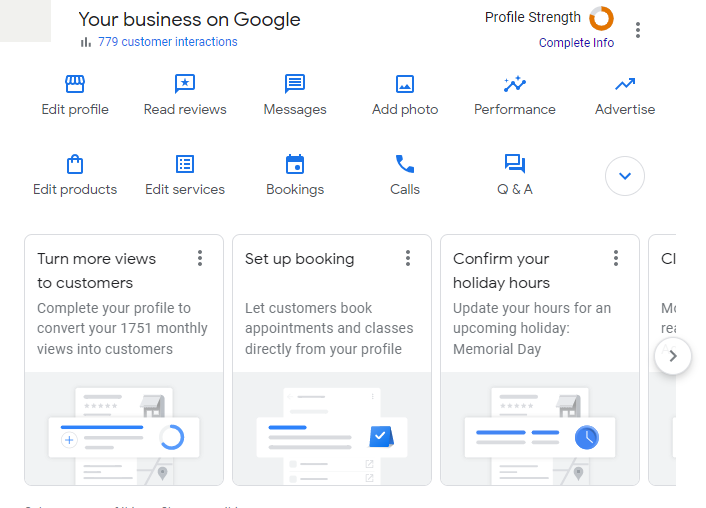
In 2022, Google announced some new updates to Google Business Profile, including managing your listing directly on the Search Engine Result Page (SERP). Sign into your Google account that is connected to your Google Business Profile and search for the name of your college or academic department in Google or simply enter “my business” in the search bar.
You will see a control panel including all the optimization options you have to update your profile.
3. Edit Profile Information
To increase your organic visibility, providing accurate information to Google and users is an essential step of your GBP optimization. On the manage panel, click “edit profile” to update:
- Name: The profile name should reflect how your users search for your institution. For example, using your full brand name is typically better than the acronym.
- Business category: Edit your GBP’s category to accurately describe your institution type. Some examples include: private university, community college, engineering school, graduate school, nursing school, etc.
- Description: You have 750 characters to describe your institution, such as the history, program offerings, and value proposition. To support your organic visibility, be sure to include your target keywords in the description.
- Website address: When updating your profile’s website address, you can use a UTM code to measure your Google Business Profile website traffic through Google Analytics 4.
- Social profiles: You can manage your social media links on GBP to connect with your audiences.
- Location: Provide your accurate physical address, Google uses it to determine your location and it can affect your rankings based on your distance to the user.
- Phone number: The best number for prospective students to reach out to you.
- Business hours: Tell Google and users when your school is open and responsive to calls and messages.
4. Improve Branding with Logo and Images
When optimizing your school’s Google Business Profile, don’t forget to set up a logo and cover photo to represent your brand. According to Google, uploading photos to your GBP can increase your user engagement. Profiles with photos receive 42% more requests for directions on Google Maps, and 35% more clicks through to their websites. To showcase your campus, facilities, and community, you may upload interior and exterior images of your institution, as well as pictures of faculty and staff.
View Google’s guide on uploading photos to Google Business Profile.
Here are some other tips on uploading photos:
- Be proactive: upload new and authentic photos regularly (we recommend once a month) to keep your profile up to date.
- Encourage your students or staff to upload pictures.
- Avoid using stock photos or text overlays.
5. Promote Your Events and Updates with Google Posts
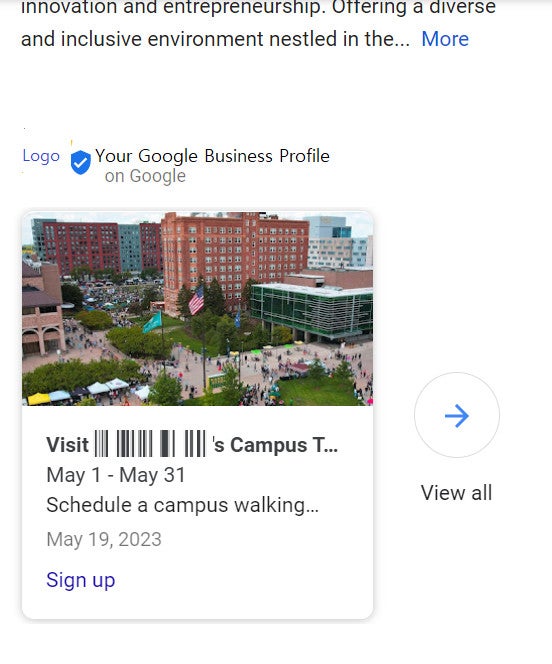
Post about your campus news and promote your upcoming events or deadlines to increase student engagement and get key messaging in front of your audience. Google Business Profile enables you to engage with your audience through posts that appear right on the search result page and in Google Maps.
For example, you may post about your open houses, campus tours, admission deadlines, and information sessions. These events and posts tend to gain more traction through Google posts.
6. Feature Your Programs with Products
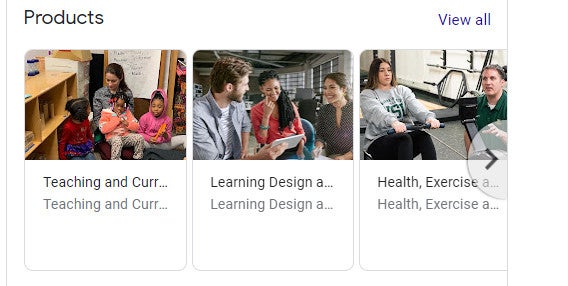
Google Business Profile allows local businesses to feature their products and services. However, for colleges and universities, you could pivot this functionality to showcase your academic programs!
For example, if you manage the school of social work profile for your university, you may feature your Bachelor of Social Work, Master of Social Work, Ph.D., and social work certificate programs on the Google Business Profile.
When adding your programs, include the program name, description, and even the tuition rate. The Google Business Profile “featured products” will link back to your website or program pages for users to continue exploring.
7. Manage Google Reviews
Local rankings are greatly influenced by your reputation and ratings. Even though it might seem like customer reviews are only relevant to local businesses like restaurants, salons, and cafes, your students’ ratings matter a lot to your institution.
In addition, review management is now more important than ever because Google’s AI Overviews can include your Google Business Profile reviews directly in search result snapshots. This AI-driven update reshapes how prospective students and their families perceive your institution, offering a glimpse into the experiences that will help them make informed enrollment decisions.
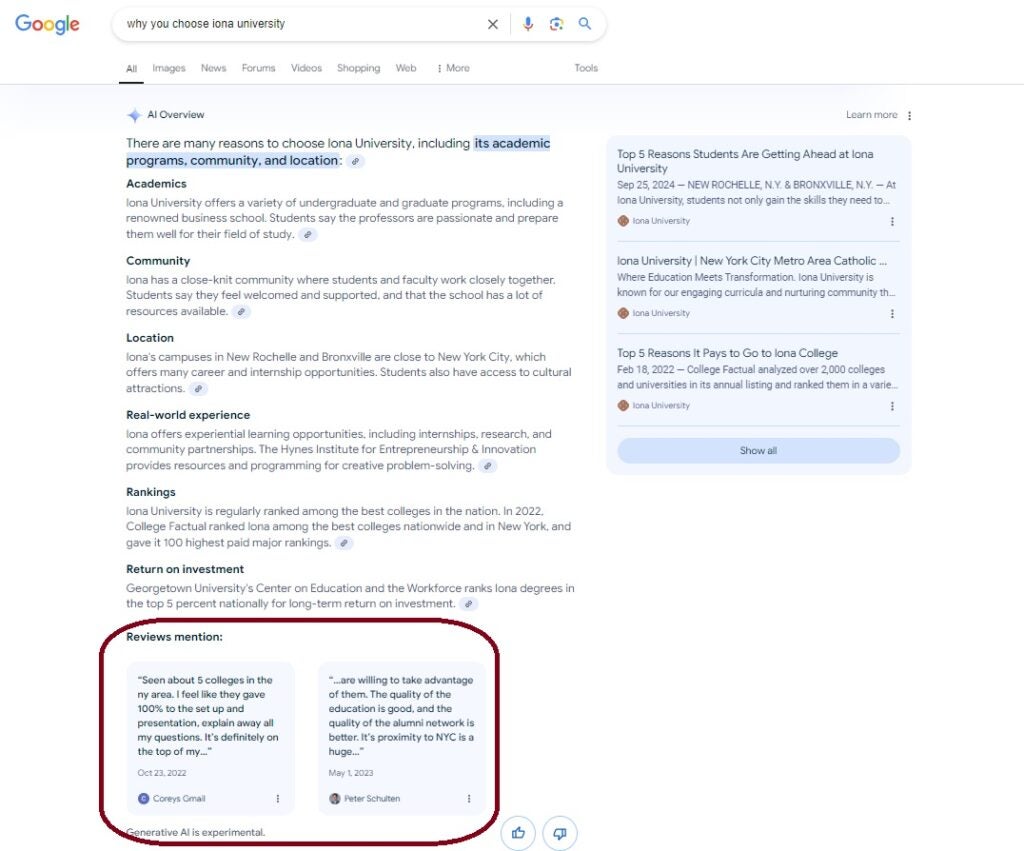
To boost your brand reputation and organic visibility, ask your students and alumni to leave reviews on your Google Business Profile. You may also respond to your Google reviews to engage and build trust with your audience.
8. Monitor the Performance of Your Google Business Profile
Last but not least, once you optimize your GBP, you can measure success right through the business manager panel. Click “Performance” to monitor your optimization results through user interactions, profile views, search keywords, and website traffic.
Limitations To Google Business Profile You Need to Know About
At Carnegie, we have discovered that if you manage a university-wide Google Business Profile, you might not have access to all of the functions we introduced above. The posts and product features may only be found in college, school, and department-level GBPs. For example, the Google Business Profile of XYZ University might not be able to post and feature products, while the GBP of the College of Business and Management at XYZ University can.
In some cases, US Department of Education data gets pulled into the profile as well in order to display the average cost after aid, graduation rate, and acceptance rate. Other areas you may see include: in-state cost by household income, notable alumni, rankings, and other schools people also search for. It’s important to note that much of this data gets pulled in from third-party sources and is something that cannot be altered. For example, if your acceptance rate data is wrong, then you would have to dispute that change with the U.S. Department of Education—you would not be able to edit it in the backend of your profile.
It’s also important to note that oftentimes Wikipedia information is pulled into Google Business Profiles. Along with a link to the associated Wikipedia page, GBP also pulls in part of the first paragraph that describes your school. Other information that can be pulled from Wikipedia includes: enrollment, dean or president of the school, and bar pass rate (for law schools). If any of the information pulled into your profile from Wikipedia is incorrect, you need to edit that information on the Wikipedia page. When making changes to your Wikipedia, make sure to cite where the information is coming from or else your edits may be removed.
How does Google Business Profile factor into local SEO ranking factors?
Google Business Profile is a key component of Local SEO. By making sure your website and online presence are optimized for local search, you increase your reach to the potential student audience. Although local search influences your national search rankings, keep in mind that everyone ranks better in their own area compared to out-of-state searchers.
Google’s local ranking is mainly determined by these three factors:
- Relevance – Your business profile needs to match what someone is searching for in order to appear for that query. Profiles should be completed with detailed information in order to attract as many search queries as possible.
- Prominence – The reputation and overall brand awareness of your institution play an essential part in your local ranking. “Prominence” is measured by how much information Google has about a business across the web. Therefore, creating more content on your website and social media, and increasing your Google review count and scores can positively impact your local ranking. Your overall website ranking position on the search engine result page is also a factor in how your Business Profile ranks, which means it’s important to ensure your website applies general SEO best practices.
- Distance – Local rankings are determined by how far the business listing is from the location term used in a search or from the searcher’s location.
Start Increasing Your Organic Visibility with Google Business Profile!
Google Business Profile is a powerful tool that can help you increase your visibility in search engines and communicate with your students. Start by claiming ownership of your institution’s GBPs to protect your brand and apply the best practices introduced in this post to utilize your profiles to the fullest.
Need more assistance with managing your school’s Google Business Profile? Talk to our expert Search Engine Optimization team!